PBIS Rewards Family
- 3.4
- Rating
- 100.00K
- Installs
- Free
- Price

 Analysis by App-foxy
PBIS Rewards Family is the kind of education app that sounds simple until you try to use it in the middle of a busy school week. Its purpose is to give parents and guardians a window into the PBIS Rewards system used by a participating school. In my experience, that makes it less like a general parenting tool and more like a school-connected portal: its usefulness depends heavily on whether your child’s school has set up the system and whether your family account is connected correctly.
The app is free, aimed at everyone, and developed by Navigate360, LLC. It has passed the point of being a brand-new experiment, having first appeared in late 2020, and it is available for devices running Android 8.0 or later. The current release is identified as version 500005. Those details matter mainly because families using older phones should check compatibility before spending time troubleshooting an installation problem.
What I like about PBIS Rewards Family is its focused role. Instead of asking parents to rely on paper notes, occasional conversations, or a separate school communication channel, it is designed to connect the family side with the school’s PBIS Rewards environment. What I would not do is install it expecting a complete behavior-management program that works independently of a school. It is a companion to an existing school process, not a replacement for teacher communication.
You May Also Like

 Blood Strike: 2.5 Anniversary
Blood Strike’s Loadouts Turn Every Drop Into a Tactical Gamble
A close look at Blood Strike’s custom loadouts: how fast access to signature weapons reshapes its battle royale rhythm, rewards preparation, and narrows the gap between fights.

 Pandora - Music & Podcasts
Pandora’s Music Is Easy to Start, but Harder to Recover
Pandora’s strength is its low-effort path from a seed to a station. Its weak spot is how much confidence it asks you to place in connection, setup, and quiet recovery.

 8 Ball Pool
 Is Built on Rivalries, Rematches, and Routine
A close look at the rivalries, rematches, shared routines, and unanswered safety questions that turn a quick pool match into a persistent mobile community.

 Samsung Music
’s Quiet Strength Is Playing What You Already Own
Its reach comes less from spectacle than from dependable access to a personal library. That simplicity is both the app’s strongest retention engine and its ceiling.

 AccuWeather: Weather Radar
AccuWeather Review: A Quick, Clear Forecast for Everyday Decisions
For everyday plans, the best forecast is the one you can understand quickly. AccuWeather makes rain timing, radar, and local conditions easy to act on, with a few trade-offs.

 Hill Climb Racing
Why Hill Climb Racing Still Turns Crashes Into One More Run
A tiny car, a bumpy hill and one more upgrade: Hill Climb Racing keeps resurfacing because its simple chaos makes every near-miss feel personal.
More From Our News Desk



Where families usually get stuck before the app becomes useful
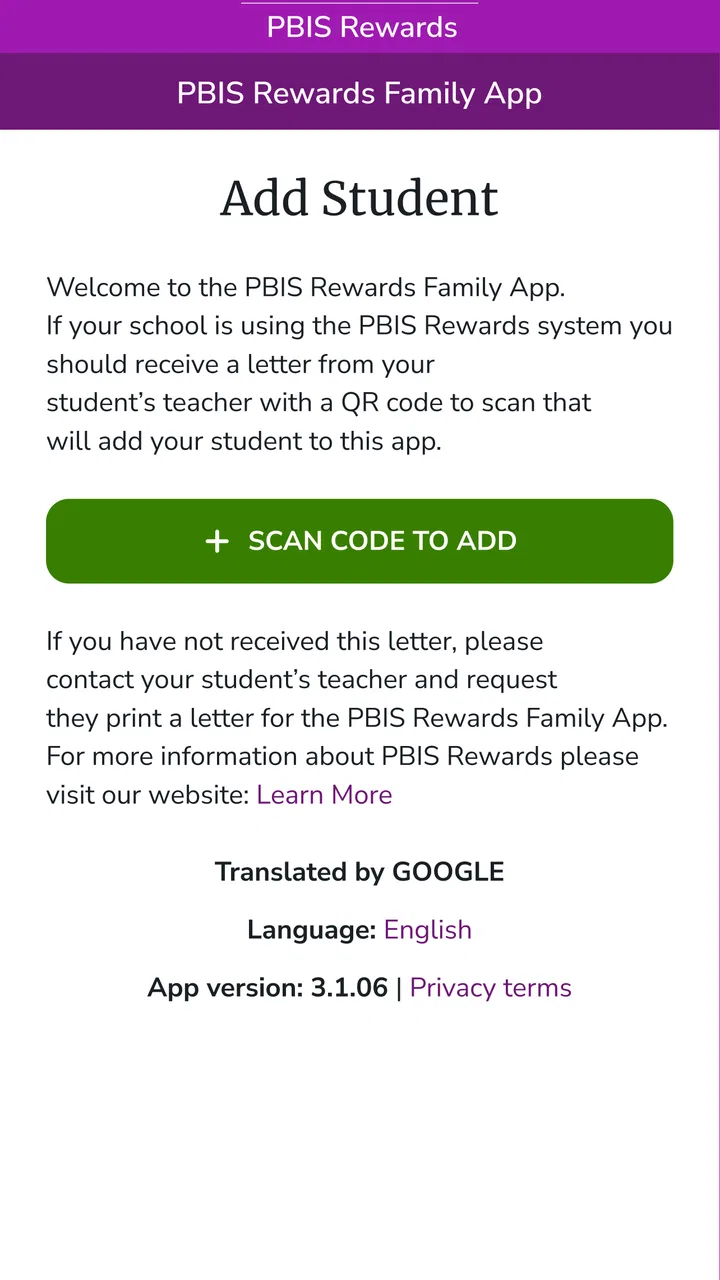
The first point of friction is often not the screen design but the connection between the app and the school. A parent may download PBIS Rewards Family, open it, and reasonably expect to create an account immediately. That expectation can lead to confusion if the school has not yet supplied the right invitation, access details, or instructions. Because this is a portal for a school-based system, the app cannot by itself establish the relationship between a household and a student record.
I would therefore treat the school’s instructions as part of the setup, not as an optional extra. If a teacher, office, or school administrator told you to use a particular email address or enrollment method, follow that path exactly. Using a different address can make the app appear empty even when the school is actively using PBIS Rewards. This is one of the most important practical distinctions between this app and a standalone family organizer.
Another common stumbling block is expecting immediate information after signing in. A blank or incomplete view does not automatically mean the application is broken. It may indicate that the child has not been connected to the family account, that the school has not entered information yet, or that the account was created with details that do not match the school’s records. I would first verify the account and school connection before repeatedly reinstalling the app.
The app’s average rating is 3.4 from around 167 ratings, with 72 written reviews. I read that as a sign to keep expectations realistic rather than as a reason to dismiss it. School-linked software is judged not only by its interface but also by account setup, staff adoption, and the accuracy of the information flowing into it. A smooth experience for one family can coexist with frustration for another if their schools use the system differently.
What to check before blaming the application
Before troubleshooting, I would confirm four basics: the phone’s operating system, the exact app being installed, the account details supplied by the school, and the child or children the school intended to connect. The minimum operating-system requirement is Android 8.0, so an older Android phone may fail before the app can be evaluated fairly. On a supported device, I would also make sure the app is updated to the current version shown in the store rather than relying on an old installation.
It is worth checking whether you are using the family portal rather than searching for a similarly named school or staff application. PBIS Rewards is a broader system, and families may encounter several references to it while looking for help. Choosing the wrong app can produce a perfectly normal login failure because the software is intended for a different role.
I also recommend writing down the exact email address or username used during setup. Small differences, such as a personal address instead of the address given to the school, can create a second account that has no student connection. If more than one guardian needs access, I would ask the school whether each adult should have a separate account rather than sharing one. That approach keeps the problem easier to diagnose and avoids changing credentials without knowing which account is linked.
For a child who attends more than one school or has recently transferred, ask which school record should be active. A family portal can only be as clear as the student association behind it. Recent changes may need to be handled by the school rather than inside the phone app. In that situation, tapping through every menu is unlikely to solve the underlying record issue.
A calmer setup routine saves time
My preferred setup routine is deliberately boring. I install the official family app, check that the device meets the Android requirement, use the school-provided account details, and complete the first sign-in while I have the school’s contact information nearby. I then look for the child’s connection and any information the school said should be visible. If that connection is missing, I stop there and contact the school instead of creating several new accounts.
On iPhone or iPad, I would apply the same logic even though the operating-system requirement listed here is expressed for Android. The key question is not simply whether the app installs; it is whether the school has enabled the family connection and supplied the correct path into the system. This distinction helps prevent a device issue from being confused with an account issue.
Families should also decide who will actually check the portal and when. If adults open it only when something seems wrong, a small account problem can become a larger source of worry. A short check after school or before a weekly family conversation is more practical than constantly refreshing the app. The portal works best when it supports a routine rather than becoming another notification source.
Recovering from a failed or confusing workflow
When something goes wrong, I would troubleshoot in layers. First, close and reopen the app and confirm that the phone has a working internet connection. Next, check that the sign-in details are being entered exactly as intended. After that, verify whether the school has connected the correct student. Only then would I consider reinstalling the app, because reinstalling can refresh the local installation but cannot repair a missing school-side association.
If the app opens but information appears outdated, take note of what is actually missing. Is the entire account inaccessible, or is one expected item absent? Those are different problems. A complete sign-in failure points toward credentials, compatibility, or account access. A successful sign-in with incomplete information is more likely to require a school-side check. Describing the problem precisely will make a conversation with school staff much more productive.
I would avoid repeatedly changing passwords or registering new accounts while investigating. That can make it harder to identify which login the school recognizes. Keep one set of credentials, record the time of the problem, and capture the wording of any error message for the school or support contact. This is a small habit, but it prevents the common cycle of guessing, creating duplicates, and losing track of the original account.
There is also a useful difference between a temporary app problem and a workflow problem. A temporary issue may disappear after reopening the app or installing the latest release. A workflow problem remains because the family is waiting for an action from the school, such as linking a student or correcting an account detail. PBIS Rewards Family can display the family side of the system, but it cannot independently correct information maintained elsewhere.
Everyday use: a realistic family check-in
Imagine a guardian checking the portal after a child comes home from school. The goal is not to turn the evening into an audit. The guardian wants to understand whether the school’s PBIS process has produced something worth discussing, then connect that information to the child’s own account of the day. I find this is where the app can be more useful than a generic notes application: it gives the conversation a school-related starting point when the school has connected the family correctly.
The best use is usually brief and specific. A parent can check the available information, ask the child what happened during the day, and avoid treating the screen as the only version of events. If the child’s explanation and the portal do not seem to match, that is a reason to ask a calm question, not to make an immediate judgment. School records and family conversations serve different purposes, and the app should support communication rather than replace it.
A second practical use is preparing for a conversation with a teacher. Instead of saying only that “the app is not working,” a parent can explain whether login succeeded, whether the student appeared, and which part of the expected workflow stopped. That level of detail helps distinguish an access problem from a question about how the school uses PBIS Rewards. It also keeps the conversation focused on a concrete next step.
For households with multiple guardians, agree on who will handle account questions and how information will be discussed at home. Separate accounts may be preferable if the school supports them, but the school should confirm the correct arrangement. Sharing a password informally may seem convenient, yet it can make recovery and accountability more complicated if something changes later.
When the app is not the real cause
It is easy to blame the phone because the phone is where the problem appears. In this case, that can be misleading. A school may use the PBIS Rewards system in a limited way, update information on its own schedule, or require staff action before a family sees anything. If the app launches and accepts the account but the expected student information is absent, I would contact the school before assuming the installation is defective.
The same applies when a child changes classrooms, schools, or enrollment status. A family may continue using the same device and login while the underlying school record changes. The resulting confusion can look like a broken portal, even though the phone is functioning normally. Ask the school to confirm the active connection and allow time for any correction to take effect.
PBIS Rewards Family is also not the right choice for parents who want a fully independent reward chart, chore tracker, or behavior journal. A standalone family app is better when the household wants to define its own goals, points, reminders, and rewards without school involvement. This portal makes more sense when the school already uses PBIS Rewards and has invited families into that process.
Likewise, parents looking for detailed academic progress, homework management, attendance records, or direct teacher messaging should not assume those functions belong here. The app’s stated role is the family portal for PBIS Rewards, so its value comes from that specific connection. A school’s main communication platform may remain the better place for broader educational information.
How it compares with ordinary alternatives
Compared with paper behavior notes, the app can be easier to revisit and less likely to disappear in a backpack. Compared with a general school messaging service, it is more focused on the PBIS Rewards relationship. That focus is both its advantage and its limitation. You get a purpose-built family doorway into the school’s PBIS process, but you should not expect the breadth of a full school-information system.
Compared with a home-made spreadsheet or a family reward chart, it has the potential to keep the school and household conversation closer together. The trade-off is control: parents cannot simply redesign the school’s process to match their preferred reward system. If the family wants complete customization, a general-purpose tool will feel more flexible. If the family wants visibility into a participating school’s existing approach, this app is the more relevant option.
Its free price removes one barrier to trying it, and the Everyone age rating makes it suitable for a broad family audience. Still, free does not mean frictionless. The real investment is attention during setup and communication with the school when the account does not connect. I would judge it by whether it reduces confusion in your particular school community, not by comparing it with apps that solve a different problem.
My practical verdict for families
After looking at the app as a parent-facing tool rather than a general education platform, I see a useful but highly dependent product. Its biggest strength is the school connection; its biggest weakness is that families cannot fix every connection problem from the phone. When the school has adopted PBIS Rewards, supplied clear instructions, and linked the right student, the portal can give parents a convenient way to stay oriented.
I would recommend trying it if your child’s school specifically uses PBIS Rewards and has asked guardians to join. Start with the school’s instructions, use one carefully verified account, and treat missing information as a signal to check the school connection before reinstalling. Those steps address the most likely sources of frustration without turning a simple family portal into a long technical project.
I would skip it, or at least avoid expecting much from it, if your school does not use the PBIS Rewards system or if you need a complete household behavior-management app. In those cases, a standalone reward chart or the school’s broader communication platform may fit better. The current release and broad device support make it accessible to many families, but accessibility does not remove the need for school participation.
Overall, PBIS Rewards Family earns its place when it fills a specific gap between a school’s PBIS process and the home. It is not a magic fix for unclear communication, and it should never be the sole basis for judging a child’s day. Used as a focused check-in tool, with realistic expectations and a willingness to contact the school when the account does not line up, PBIS Rewards Family can be a sensible free addition for families already inside that school ecosystem.
FAQs for PBIS Rewards Family
01What is PBIS Rewards Family, and who is it designed for?
PBIS Rewards Family is a companion app for families participating in a school’s PBIS Rewards program. It helps parents and guardians view their child’s positive behavior points, recognize progress, and stay connected with the school’s rewards system. The app is most useful when the student’s school has already adopted PBIS Rewards and has provided families with access instructions or login details.
02How do parents or guardians sign in to PBIS Rewards Family?
Access generally depends on the setup used by the student’s school. After downloading the app, a parent or guardian may need to create an account, accept an invitation, or use credentials supplied by the school. If the child does not appear, the account information is incorrect, or an invitation has expired, the school’s PBIS Rewards administrator is usually the best contact for resolving the issue.
03What information can families see in the app?
The available information can vary according to the school’s configuration, but families can typically review a student’s PBIS points, positive behavior activity, and available rewards or redemption history. Some schools may display additional announcements or program details. Because the app reflects data entered by teachers and administrators, updates may not appear immediately after a behavior or reward transaction.
04Can PBIS Rewards Family be used to redeem rewards directly?
PBIS Rewards Family may allow families to view reward opportunities and monitor whether a student has enough points, but the exact redemption process is controlled by each school. Some rewards may be handled through the school, while others could require a teacher or administrator to approve the exchange. Families should check the school’s rules before assuming that points can be redeemed directly in the app.
05Is PBIS Rewards Family free, and what should users know about privacy?
The family app is generally provided as part of a school’s PBIS Rewards implementation, so families typically do not pay to access the basic service. However, availability and features depend on the participating school. Since the app handles student-related information, parents should review the app’s current privacy policy and use only official login details. Questions about stored data or account removal should be directed to the school or developer.
Pros
- Lets families view school-issued points and rewards in one place.
- Can help parents discuss positive behavior goals with their children.
- Provides a direct way to stay connected with school recognition programs.
- Simple reward tracking may encourage consistent positive habits at home.
- Useful companion for schools already using the PBIS Rewards platform.
Cons
- Its usefulness depends on the child’s school actively using PBIS Rewards.
- Features may feel limited outside viewing points
- rewards
- and related updates.
- Parents may need school-provided login details before accessing the app.
- Reward information can become outdated if school staff do not update records.
- Not all schools offer the same rewards or configure the app identically.

PBIS Rewards Family
Gallery